RealmTeleport: a remote expert inside a 3D scan of your site
RealmTeleport lets a remote expert step into a 3D scan of your site to inspect, navigate and annotate it, instead of watching a single video feed. It is the next step when AI isn't enough and you need expert support. A scan with the headset takes 3–4 minutes, the build takes 5–10 minutes, and then you enter the site.
When AI isn't enough, bring the expert. Scan your site in 3–4 minutes. It builds in 5–10, then a remote expert steps in to inspect, navigate and annotate.
When to use it
Many questions on the floor are answered by the expert's published procedures in Realm Knowledge. Some need the expert. RealmTeleport is for those moments:
- Urgent faults, when production is down and you are waiting for a specialist
- Scarce specialists, when the one person who knows the equipment is somewhere else
- Support across several sites, without the travel
How a scan works
- Scan. Someone on site scans the area with the headset. The scan takes 3–4 minutes.
- Build. The 3D scan of the site builds in 5–10 minutes.
- Enter. The remote expert steps into the site to inspect, navigate and annotate.
One network of sites
RealmTeleport connects your captured sites in one network. Open any site on the map and step into it in 3D.

3D presence vs a video call
| Video call | RealmTeleport | |
|---|---|---|
| What the expert sees | What the caller's camera is pointing at | A 3D scan of the site |
| Moving around | The caller moves, the expert asks | The expert navigates the site on their own |
| Pointing things out | By describing them | By annotating the 3D scan |
| Where it fits | Quick questions | Faults and inspections where the expert needs to see the whole space |
How it fits with Realm Knowledge and Realm Operation
Realm Knowledge keeps the expert's procedures on the floor, so the next operator can follow the expert's steps without a call. RealmTeleport brings the expert in when that guidance isn't enough. Realm Operation ties Realm Knowledge, Realm Lens and RealmTeleport together with AI agent support.
Formerly WARP
RealmTeleport was formerly called WARP. You may still see the old name in earlier material.
The concept and the real portal
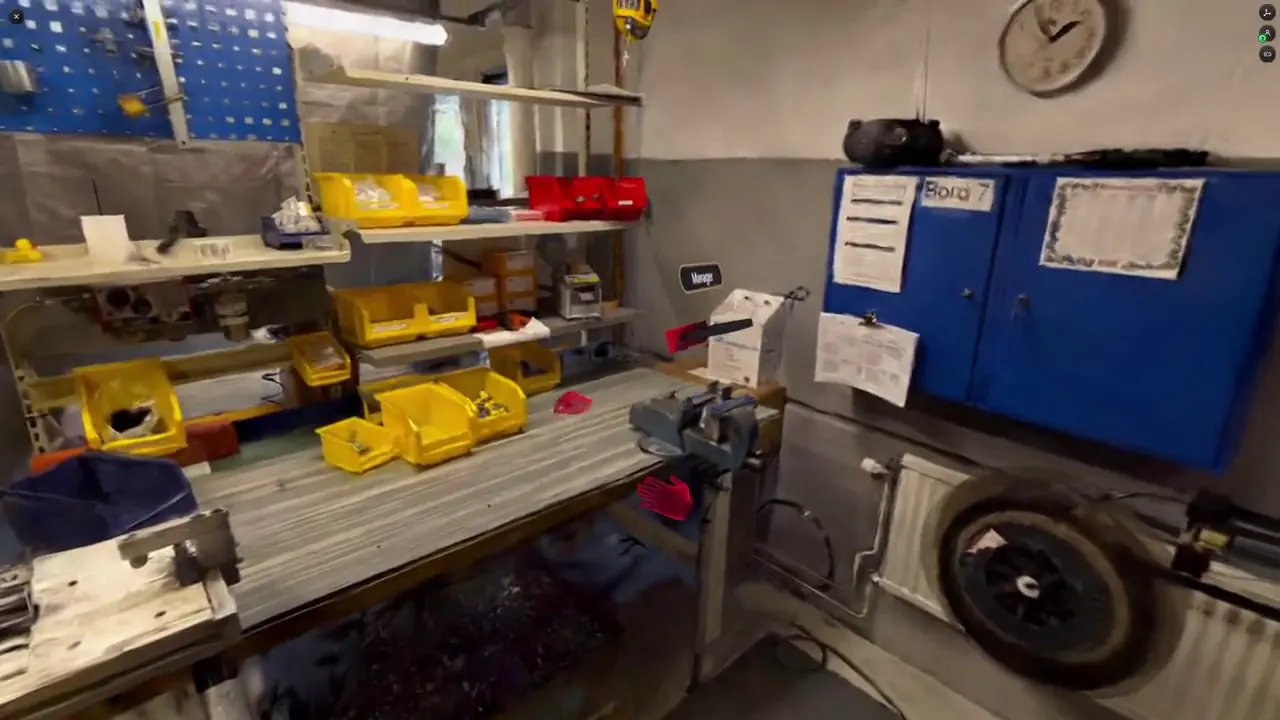
The first video is the concept film. The second is a recording from the real Realm portal: from the network map of captured sites into a site, then through two captured 3D sites, a workshop and a construction site.
Recording from the Realm portal. Construction site scene: “Empty construction lot, Bellevue WA (XGRIDS PortalCam)” by Paolo Tosolini, CC BY 4.0, reconstructed as 3D Gaussian splats. Map data © OpenStreetMap contributors, © CARTO.
Try it in a pilot
A pilot runs for 6 weeks on one real process at one of your sites. We run the pilot with your team on your floor. Self-hosted deployment available on request. Data processing agreement (DPA) with every pilot, and support for your DPIA.
Book a walkthrough or start a conversation at oscar@augmentedrealm.se.
Frequently asked questions
What is RealmTeleport?
RealmTeleport lets a remote expert step into a 3D scan of your site to inspect, navigate and annotate. It is 3D presence, not another video call, and it is the next step when AI isn't enough and you need expert support.
How long does a RealmTeleport scan take?
A scan with the headset takes 3–4 minutes. The build then takes 5–10 minutes, and you can enter the site.
How is RealmTeleport different from a video call?
In a video call the expert sees only what the caller's camera points at. In RealmTeleport the remote expert steps into a 3D scan of your site and can inspect, navigate and annotate it on their own.
Is RealmTeleport the same as WARP?
Yes. RealmTeleport was formerly called WARP.
Can RealmTeleport be self hosted?
Self-hosted deployment available on request.
How can we try RealmTeleport?
Through a 6 week pilot on one real process at one of your sites. We run the pilot with your team on your floor. You can book a walkthrough to talk it through first.